User Manual
HP SureStore Tape Drive
Model 2000/5000/6000Version 11.6Tape drive NOT included.
 Here's just what you need -- a photocopy of the user manual for the hard-to-find, out-of-print, how-to publication about this device!
Profusely illustrated in black-and-white illustrations.
Original manual was printed in four languages; the photocopy includes only the English language portion.
Tape drive not included.
TABLE OF CONTENTS
- Introduction
- Chapter 1: What You Will Need to Install...
- Chapter 2: Installing and Configuring SCSI Host Adapter
- Chapter 3: Installing an Internal SureStore Tape Drive
- Chapter 4: Installing an External SureStore Tape Drive
- Chapter 5: Using your Tape Drive
- Chapter 6: Caring for your Tape Drive and Cartridges
- Chapter 7: Reference
- Chapter 8: Troubleshooting
- Chapter 9: Service and Support
- Glossary
The manual's preface says:
"This manual explains how to install, use and care for the HP SureStore 2000,5000 and 6000 Tape Drives. Make sure that you have set up your tape drive and software correctly before you begin using it -- to do this, you should also refer to the documentation provided with the SCSI adapter and applicateon software you will be using.
HP SURESTORE TAPE DRIVES
The HP SureStore family of tape drives provide a convenient solution for backing up and restoring data to standalone workstations, networked file servers and multi-user systems. The drives store data on 4mm cartridges, which are an adaptation of the Digital Audio Tape (DAT) cartridge specially modified for the storage of computer data. All HP SureStore tape drives support the industry standard Digital Data Storage formats (including DDS, DDS-DC and DDS-2).
Using the fast search capability of the DDS format, HP SureStore tape drives can search for a file at nearly 200 times the normal read/write speed, taking an average of only 30 seconds to locate a file on a DDS cartridge.
There is a wide selection of HP SureStore tape drives to choose from:
HP SureStore Tape 2000 internal and external tape drives can store up to 2 Gbytes of data on a 90 m DDS cartridge and are capable of transferring data at rates of up to 660 Mbytes per hour.
HP SureStore Tape 5000 internal and external tape drives use data compression to store, typically, 4 Gbytes of data on a 90m DDS cartridge and are capable of transferring data at rates of up to 1.3 Gbytes per hour.
HP SureStore Tape 6000 internal and external tape drives are our DDS-2 tape drives. They, too, use data compression to store, typically, 8 Gbytes of data on a 120m DDS-2 cartridge, and are capable of transferring data at a rate of up to 3.6 Gbytes per hour.
DATA COMPRESSION AND THE HP SURESTORE TAPE DRIVE
The DDS-format of the HP SureStore 5000 and 6000 Tape Drives has been extended to include data compression (DDS-DC). Using the popular Lempel-Ziv algorithm, which is implemented in the electronics of the drive, the drive compresses data in real time. The data compression process resides in the tape drive and is transparent to the host system. This leaves the host free to manage other processes."
Tape drive not included.
DETAILS
Title: "HP SureStore Tape Getting Started".
Publisher: Hewlett Packard, Corvalis, Oregon.
Publisher's item number C1529-90906.
76 original pages, 38 photocopied 8.5 x 11" pages.
HOW SHIPPED
 Two pages of the original book are photocopied onto 8.5 x 11" copier paper, resulting in a small reduction in size of the original pages. The material is very readable.
For the basic price, the photocopied pages are shipped loose, unbound, as in the example picture at right.
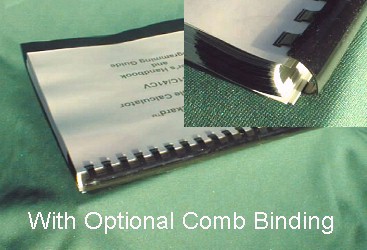 For an additional $3.00, we will have the manual punched and bound with a plastic comb so that the pages lay flat (like a cookbook) when you open it, as in the example picture at right.
Most folks think the comb binding is well worth the convenience and order it that way.
Tape drive not included.SHIPPING
$3.05 to be pre-paid by winning bidder for packaging and shipping to United States destinations (APO and FPO slightly higher).
Trademarks are the property of their respective owners.
A NOTE ABOUT THE PRICE
While our price for this manual may seem high at first blush, please consider the following:
- Original manuals for older equipment are hard to find.
- Our manuals are photocopies -- hardcopy.
- Hardcopy is much easier to read than a .pdf file on your computer screen.
- Producing a manual for you involves the following steps:
Make a trip to a photocopying store.
Make the copy.
If you asked for the copy to be comb-bound, wait for it to be punched and bound.
Bring the copy home.
Package the copy for shipping
Ship the copy to you.
The steps to get a copy to you take a lot of time. We're not getting rich. HOW TO PURCHASE THIS ITEM
Please use this e-mail link [email protected] to e-mail us about purchasing this item, or to ask a question about it.
Please ensure the e-mail link automatically inserts this item's number: 12010431 and description: HP SureStore Tape Drive Manual into the e-mail message, so we'll know which item you're referring to!
We'll get right back to you with:
- The price of the item.
- Ordering and payment information.
ADDITIONAL INFORMATION LINKS